Screen Time Limits: 7 Essential Settings That Actually Hold
Screen time limits have a poor reputation because most people have tried them and watched them fail within a fortnight. That failure is usually blamed on willpower, which is the wrong diagnosis and leads to the wrong fix. A limit fails when dismissing it is easier than respecting it, and almost every default setting can be waved away with a single tap by someone who is tired and not really deciding. The seven settings below are ordered by how hard each is to dismiss rather than by how often they are recommended, and the most effective one is not a setting at all.
Why most screen time limits are ignored within a week
The standard app timer shows a message when the allowance runs out, with a button offering fifteen more minutes. Tapping it requires no reflection, no password and no explanation, and it is tapped automatically after the second or third time it appears.
That is not a failure of resolve. It is a design where the barrier and the override live in the same place, and the override is closer to hand. The person meeting the barrier at eleven at night is not the person who set it on a Sunday afternoon, and the system treats them as the same person with the same intentions.
The useful test for any limit
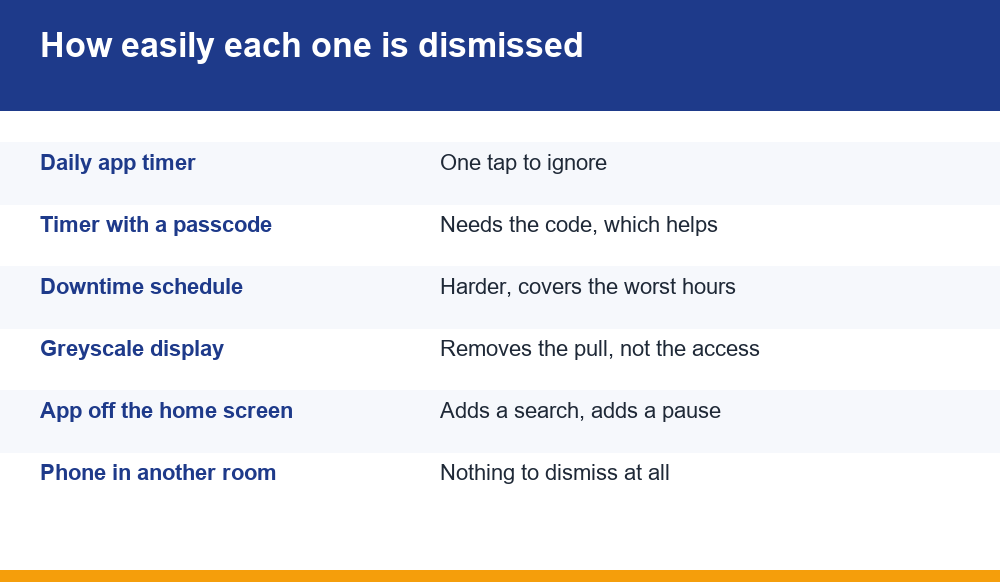
Ask how many separate, deliberate actions are needed to get past it. One tap is a reminder. Entering a code you have to retrieve is a decision. Walking to another room is a barrier. Everything on this page is ranked by that count and nothing else.
App timers, and the passcode that makes them work
Both major phone platforms offer per-app daily limits, and on their own they are weak for the reason above. One change transforms them.
Set a passcode on the screen time settings themselves, one different from your unlock code, and ideally one you do not have memorised. Written down and kept in a drawer is better than memorised, because retrieving it is the delay that does the work.
With a code in place, extending an expired timer stops being reflexive and becomes a small project. Most of the time the urge passes before the code is found, which is precisely the outcome the limit existed to produce.
- Use a code you do not use anywhere else
- Store it somewhere requiring a short walk, not in the phone
- Ask someone else to set it if you are comfortable doing so
- Set the limit lower than feels reasonable; raising it later is easy enough
Downtime, which beats daily totals
A daily total treats every hour the same. In practice the problem is concentrated in particular hours, usually late at night, and a time-based restriction is both easier to keep and more useful than a quota.
Scheduled downtime blocks chosen apps between set hours regardless of how much they have been used. Nothing accumulates, nothing resets at midnight, and the rule is the same every night, which removes the daily negotiation entirely.
Late-evening sessions are also the ones most likely to run long and be regretted, because tiredness reduces exactly the capacity needed to stop. Blocking the hours is a more direct intervention than rationing the minutes.
Notifications are the actual problem
Limits control what happens once you open an app. Notifications control how often you are invited to, and for most people that is the bigger number by a wide margin.
An app with a reason to bring you back will find one: a bonus expiring, a result, a message from somebody you do not know. Each notification is an interruption engineered by someone whose job is measured in how often you return, and declining them all is a single switch.
Turn off everything except calls and messages from real people. Badge counts deserve particular attention, since a red number creates a task that did not exist, and clearing it is the whole reason the app was opened.
Greyscale, and why it works
Switching the display to greyscale sounds like a gimmick and is one of the more effective interventions available, which is why it keeps appearing in serious advice about attention.
Colour is doing a great deal of work in modern interfaces: the red badge, the green confirmation, the animated celebration. Remove it and the same screens become noticeably less compelling, without removing any function. Nothing is blocked; the pull is simply weaker.
Both platforms allow greyscale on a schedule or bound to an accessibility shortcut, so it can be enabled for the evening automatically. People who try it for a week typically report checking the phone less without having decided to.
Moving apps off the home screen
Small, free, and consistently underrated. An icon on the first screen is opened by muscle memory, frequently without any decision having been made at all.
Bury the app in a folder on the last page, or remove the icon entirely so it can only be reached by searching for it. Typing the name is a deliberate act, and deliberate acts can be reconsidered in a way that thumb-habit cannot.
The same logic covers logging out at the end of each session rather than staying signed in, and declining to save the password in the browser. None of it prevents anything. All of it inserts a pause at the point where a pause is worth something.
Charging the phone somewhere else
The single most effective screen time intervention is also the least technical: the phone charges in a different room overnight.
This removes the late-night session and the first-thing-in-the-morning one together, which between them account for a large share of the problem. It needs no app, no passcode and no configuration, and there is nothing to dismiss because there is no prompt.
The usual objection is the alarm, and the usual answer is a cheap alarm clock. The second objection is emergencies, which is worth taking seriously: most phones allow calls from selected contacts to break through overnight modes, so the genuine case is covered without the handset being within reach.
One commitment that is not a setting
Every item above is private, which is their shared weakness. The only person who sees a limit removed is the person removing it, and that person has already decided.
Telling somebody changes that. Not asking permission, and not handing over control, simply saying out loud what you have set. A limit that another person knows about carries a cost to remove that no passcode can replicate.
Where the pattern has gone beyond a question of habit, the same principle extends to free and confidential support services, which exist in most countries and begin with a practical conversation rather than a heavy one. We set out what that early pattern looks like in our piece on how the habit loop forms.
Why short-session apps are the hardest
One category resists all of this more than the rest, and it is worth naming because the usual advice assumes long sessions.
Apps built around a cycle measured in seconds never present a natural stopping point. A video ends, an article finishes, a chapter closes. A thirty-second round followed immediately by another offers no such break, and the decision to stop has to be generated internally rather than supplied by the content.
| App type | Where the stopping point comes from |
|---|---|
| Film or series | The episode ends |
| Article or book | The piece finishes |
| Social feed | Nowhere, but fatigue arrives |
| Short repeating rounds | Nowhere at all, and fatigue is slower |
For that last category, the time-based controls on this page matter more than the quota-based ones, because the thing that needs interrupting is the cycle rather than the total. A hard stop at a set hour works. A daily allowance tends to be spent in one sitting and then extended.
It also makes the external measures more important than usual. Where an app provides no internal reason to stop, the stop has to be imposed from outside, whether by a passcode in a drawer, a charger in another room or a person who knows what you decided.
Screen time limits for someone else
Everything above assumes you are setting screen time limits for yourself. Setting them for a child or a family member is a different problem, and the technical part is the easy half.
The controls work the same way, with one advantage: the passcode genuinely sits with somebody else, which removes the weakness that undermines self-applied limits. That advantage is also the source of the difficulty, because a restriction imposed without explanation tends to be treated as an obstacle to route around rather than a rule to follow.
What seems to work better is agreeing the rule and then letting the software enforce it, so the limit is a shared decision the phone implements rather than a punishment the phone delivers. Where the person being limited helped choose the hours, compliance is markedly higher and the workarounds largely stop.
- Agree the hours together before configuring anything
- Explain what the limit is for rather than only what it blocks
- Review it on a schedule, so it can loosen as well as tighten
- Expect workarounds to be attempted; treat them as a signal rather than a betrayal
Two technical gaps are worth knowing about in this context. Restrictions applied to one device do not follow a person to a tablet, a console or somebody else’s phone. And a second account on the same handset can sidestep per-profile settings entirely, which is a detail most parents discover considerably later than their children do.
Reviewing the arrangement
Screen time limits are set once and then quietly decay, usually because a phone was replaced, an update reset a preference, or an exception made for one evening was never reversed.
A short review every few months catches all three. Open the settings, check the limits are still listed, check the passcode still works, and look at the actual usage figures rather than the limits themselves. The usage number is the only honest measure of whether any of it is working.
If the figure has drifted upward, the useful response is to add a barrier with a longer delay rather than to lower the same limit again. Repeating a control that has already failed produces the same result the second time.
Frequently Asked Questions
Why do app timers stop working after a few days?
Because the override sits next to the barrier and takes one tap. Adding a separate passcode to the screen time settings, stored somewhere that requires retrieving, converts dismissal from a reflex into a deliberate act, which is usually enough for the urge to pass.
Are daily limits or scheduled downtime better?
Downtime, for most people. The problem is concentrated in particular hours rather than spread evenly, a time-based rule is the same every night so there is no daily negotiation, and late sessions are the ones most likely to run long.
Does greyscale actually make a difference?
More than it sounds like it should. Colour does a lot of work in app interfaces, particularly badges and celebration animations, and removing it makes the same screens noticeably less compelling without blocking anything. It can be scheduled for evenings automatically.
What is the single most effective change?
Charging the phone in another room overnight. It removes the late-night and first-thing sessions together, requires no configuration, and has nothing to dismiss because no prompt ever appears. A cheap alarm clock resolves the usual objection.
Why are short-round apps harder to put down?
They never supply a stopping point. A film ends and a chapter closes, but a thirty-second cycle followed immediately by another leaves the decision to stop entirely to you, at the time you are least equipped to make it. Time-based blocks work better than daily quotas here.
