
Report fake gaming app – 6 Easy Steps Every Indian User Must Know
If you are trying to report fake gaming app losses, the single thing almost every page on this topic gets wrong is the order. Nearly all of them teach you how to spot a fake app — misspelled developer names, impossible payout promises, a download link sent on WhatsApp — and then stop, as if recognising the problem were the same as handling it. It is not. Once money has already left your account, spotting skills are behind you, and what matters is a sequence: what you preserve, who you contact first, and what you do only after that.
Done in the right order, each step feeds the next. Done backwards — and most people do it backwards, starting with angry messages to the app’s own support chat — you lose the evidence and the time window that the later steps depend on. What follows is the missing next step, written in the order that actually matters, with the reasoning behind each position in the sequence so you can adapt it if your own situation does not match the usual pattern.
What Most Checklists Leave Out
A spotting checklist is genuinely useful before you install anything. We keep one of our own: the warning-sign list in our rundown of fake gaming app warning signs in India is the right thing to read when an app is still a link in your inbox. But almost nobody arrives at this topic that early. People search for how to report fake gaming app problems after a withdrawal has been refused, after a “verification fee” was demanded, or after an account was locked with a balance showing inside it. At that point a list of red flags is a post-mortem, not a plan.
The second gap is sequencing. The reporting channels available in India are not interchangeable and they do different jobs. A helpline call exists to get a money trail flagged quickly. A bank dispute exists to put a formal mark on a specific transaction. An online complaint exists to create a documented, trackable case file. A store report exists to get a listing reviewed and possibly removed so the next person does not land on it. If you do the slow, documentary step first and the fast, money-trail step last, you have inverted the only thing about the process that is time-sensitive.
The third gap is honesty about outcomes. Pages that want your click imply that reporting equals recovery. It does not, and being told otherwise is how people end up paying a second time to someone promising to retrieve the first payment. Reporting is still worth doing — it is the only route that creates a record, and records are what occasionally produce a reversal — but you should walk into it with accurate expectations rather than hope.
The fourth gap is practical: nobody tells you to prepare once and reuse. Each channel asks for a slightly different form, but the underlying material is the same handful of items. People who assemble that material first finish all four steps in an afternoon. People who improvise each form separately spend days hunting for the same screenshot three times, and by the third attempt the app has often locked them out.
The First Hour Matters More Than A Perfect Complaint
Money that has just moved is easier to trace than money that moved last week. That one fact dictates the whole structure of what follows. In the first hour your job is not to write a beautifully worded complaint; it is to make a fast phone call, raise a bank ticket, and capture screenshots. Polishing the written complaint can happen in the evening. Chasing a trail that has already been broken up and moved onward cannot.
Start by stopping. Do not make another payment of any kind, whatever reason is given — unlocking, tax, verification, processing, a “small top-up to release the withdrawal”. This is the point at which an operator’s pressure tactics are at their most intense, precisely because they can sense that you are about to stop being a paying user. A second payment does not recover the first one. It simply doubles the amount you are reporting. The same reasoning explains why a sense of urgency is manufactured in the first place, something we cover in our breakdown of the real risks behind real-money gaming apps in India.
Then uninstall nothing. This is the counter-intuitive one. Deleting the app feels like taking back control, and people do it in the first minutes out of disgust. But the app is where your transaction history, your in-app chat log, your account ID and the payee details live. Once it is gone — or once your account has been locked from the other side — that material is usually unrecoverable. Capture everything first, and uninstall only when you have saved what you need somewhere else.
One more first-hour habit: tell one other person in the room what has happened, out loud. It sounds like an emotional suggestion and it is partly that, but it also has a flatly practical effect. Saying the sequence of events to another human forces it into chronological order, which is exactly the form every later step needs it in, and it makes you far less likely to accept the next urgent-sounding demand from inside the app while your judgement is still rattled.
Evidence Checklist: What To Save Before You Touch Anything
Every channel you will use asks for roughly the same things, so gather them once and reuse the same bundle. Take screenshots rather than photographs of your screen, keep them in a single dated folder, and do not crop out timestamps — the timestamps are often the most useful part.
- Transaction IDs for every payment: the UPI reference number (UTR), or the card or wallet transaction reference. These are the single most important items.
- Payee details exactly as shown — the UPI ID, the beneficiary name that appeared on the confirmation screen, or the account and IFSC if it was a bank transfer. Copy the text, do not retype it from memory.
- Date, time and amount of each payment, plus the running total.
- Your bank or UPI app statement covering the period, exported as a PDF rather than screenshotted piecemeal.
- The app listing itself: the store page, the developer name, the package or bundle identifier, the version number and the exact download source if it came from outside a store.
- Chat and support logs, including any WhatsApp or Telegram conversation in which the app was promoted to you, and whatever was said when you asked for a withdrawal.
- In-app records: your account or player ID, deposit history, balance, and the screen showing the refusal, lock or extra demand.
- Any phone numbers, email addresses or links used to contact you.
One extra habit pays off later: write a short, plain timeline in a notes file — what happened, in order, with dates. When you file the written complaint, you will be asked to describe events clearly, and a timeline you wrote while it was fresh is far better than one reconstructed days later under stress. Keep it factual. Resist the urge to speculate about who is behind the app or where they are; describe only what you saw and what you paid.
Store the bundle somewhere that is not only on the phone that has the app on it. Email the folder to yourself, or copy it to a laptop or cloud drive. Phones get wiped, reset or handed in for repair in exactly the week when you least want to lose the evidence, and a sideloaded app that asked for broad permissions is not something you want to be the sole custodian of your records. Two copies in two places takes five minutes and removes a whole category of regret.
What not to bother collecting
Skip the things that feel important but add nothing. Screenshots of other people’s complaints in app-store reviews, forwarded messages claiming the same app cheated someone else, and your own annotated screenshots with arrows and circles drawn on them do not strengthen anything — and edited images are weaker than clean originals. Keep the originals unmodified and put your interpretation in the written timeline instead, where it belongs.
How To Report Fake Gaming App Losses: The 6 Steps In Order
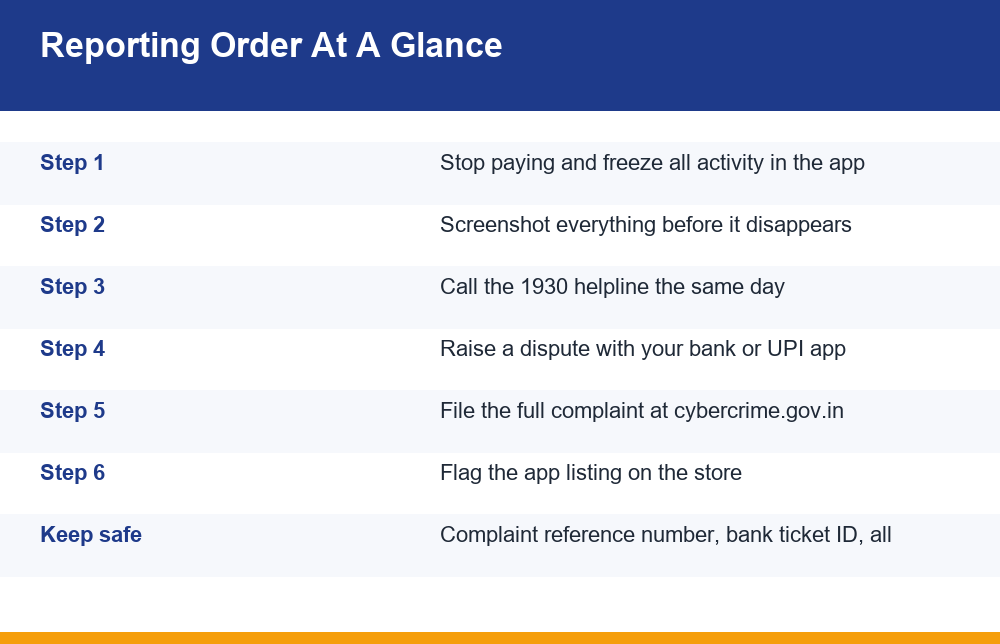
Here is the sequence. The ordering is deliberate: fast money-trail actions first, documentary actions second, platform cleanup last. Follow it top to bottom and you will not have to redo any step.
- Freeze and preserve. Stop all payments. Do not uninstall. Capture the full evidence bundle described above, including every transaction ID.
- Call the 1930 helpline. Do this the same day, ideally within hours. Have your transaction IDs in front of you before you dial, because the call will be short and factual.
- Raise a dispute with your bank or UPI provider. Use the official in-app dispute flow or the bank’s registered complaint number — not a number you found through a search result or a social media reply. Ask for a written ticket or reference number.
- File the detailed online complaint. This is where your timeline, statement PDF and screenshots go. You will receive a complaint reference number; save it and a copy of the submitted form.
- Report the app listing on the store. Use the store’s own report option on the app’s page so the listing itself gets reviewed, separately from your money complaint.
- Secure your own accounts and follow up. Change the password and remove any payment instrument or auto-debit mandate you set up for the app. Then track your complaint reference and respond promptly to any request for more information.
The table below shows why each channel exists, so you can see at a glance that they are not duplicates of each other and that skipping one does not get covered by another.
| Channel | What it is for | When to use it |
|---|---|---|
| 1930 helpline | Getting a fresh money trail flagged quickly by phone | Same day — first, if money has moved |
| Bank or UPI dispute | Placing a formal dispute against specific transactions | Within hours of the helpline call |
| Online complaint portal | Creating a documented, trackable case with evidence attached | Same day or next day, after the fast steps |
| App store report | Getting the listing reviewed so others stop landing on it | After your money complaint is filed |
| Account cleanup | Removing saved cards, mandates and shared passwords | Immediately after reporting |
| Follow-up | Supplying extra details and tracking the reference number | Days to weeks afterwards |
Two notes on adapting the sequence. If the money has not actually left yet — you were asked for a fee and refused — steps two and three are not needed, and you can go straight to preserving evidence and flagging the listing. And if several payments went out over weeks rather than one going out this morning, do not let the delay stop you: report all of them together as a single episode with a running total, because a pattern of payments to the same payee is more useful to describe in one place than drip-fed in separate complaints.
Bank And UPI Disputes: What Actually Happens
People expect a bank dispute to work like a card chargeback on a shopping site: you say the goods never arrived, and the money comes back. A UPI payment behaves differently. It is a push payment — you authorised it, it settled instantly, and the funds landed in a real account somewhere. There is no built-in reversal switch that a branch employee can flip. What a dispute does is put the transaction formally on record and allow the bank to attempt action on the receiving side, which depends entirely on whether anything is still sitting there.
That is why speed is the whole game. Money received by an account used for this purpose is usually moved onward very quickly and in pieces. If you report while a balance remains, there is something to act on. If you report after it has been dispersed, the dispute still matters for your record, but the practical odds drop sharply. Nobody can give you an honest percentage here, and anyone who does is making it up — but the direction is not in doubt: hours are better than days, and days are better than weeks.
Two practical notes. First, raise the dispute through a channel you reached yourself — the app’s own help section, the number printed on your card, or the bank’s official site typed in by hand. The period right after a loss is exactly when fake “bank helpline” numbers get the most traffic. Second, insist on a reference number in writing. A phone conversation with no ticket ID is not a dispute you can later prove you raised, and your online complaint will go further if you can cite the bank ticket alongside it.
Card and wallet payments sit somewhere between the two extremes. A card payment has a dispute process behind it that is genuinely designed for contested merchant charges, so it is worth raising there as well as everywhere else. A wallet top-up that was then spent inside the app is the hardest of all, because the wallet did what you asked and the loss happened a step later. In every case the useful move is identical: raise it through the provider’s own channel, state the transaction references, and get a ticket number. What differs is the odds, not the action.
The 1930 Helpline And The Reporting Portal, Explained
1930 is India’s national helpline for reporting online financial fraud. It is a phone channel, built for speed rather than detail: the point is to get a live, recent money trail flagged while there is still a chance of acting on it. Call it when money has actually left your account. Keep the call tight — amounts, dates, transaction IDs, the payee ID as shown on your receipt — and write down whatever reference you are given. It is not a place to narrate the whole story or to ask for advice about the app.
The written side of the process happens on the national reporting portal at the government’s cyber crime reporting portal, where you register with a mobile number, choose the relevant category, describe what happened and upload your evidence. This is the slower, documentary step and the one where your prepared bundle pays off: statement PDF, screenshots, timeline, and the bank ticket ID if you already have it. When the complaint is submitted you receive a complaint reference number — treat it the way you would treat a receipt, because every later follow-up is keyed to it.
A small but common confusion is worth clearing up: the helpline call and the online complaint are not alternatives. The call is a flag; the complaint is a file. Making the call does not file anything for you, and filing online does not produce the speed of a phone flag. People who do only one of the two usually did the slow one.
Two things to prepare before you start the written form. Have a soft copy of an identity document ready, and have your attachments already sized and sensibly named — upload forms carry per-file size limits, and renaming eleven files called Screenshot_04.png halfway through a session that may time out is a miserable way to spend an evening. If you reach the end and realise one detail is missing, submit anyway with what you have and add the rest through the follow-up route; an incomplete complaint filed today beats a perfect one filed on Sunday.
Flagging The Listing On Google Play Or The App Store
Reporting the listing is the step people skip, because by that point they are exhausted and it does nothing for their own money. It is still worth five minutes. A store report is the only action that can take the app out of circulation, and it is the only part of this process that helps the next person who gets the same forwarded link.
On Google Play, open the app’s own store page, use the overflow menu or the flag option on the listing, and choose the category that matches what happened — typically the option covering fraud, deception or a misleading listing. On Apple’s App Store, use the report option on the app’s product page. Then write two or three plain sentences: what the app claimed, what you paid, what was refused. Short and specific beats long and furious, because a reviewer is checking a claim, not reading a complaint letter. Include the developer name and version number if the form allows it.
Expect no reply. Store reports are not a correspondence channel, and the absence of an acknowledgement does not mean nothing happened. It also means you should not wait on the outcome before doing anything else — this step sits last in the sequence precisely because nothing further depends on it. If the listing does disappear later, rely on your own earlier evidence folder rather than assuming the store page can be revisited; removed listings take their developer details with them.
If the app never came from a store at all
Many of these apps are distributed as direct installer files through messaging groups, so there is no listing to flag. In that case, report the distribution channel instead: use the in-app report function on the group, channel or account that sent it, and include the download link in your written complaint rather than clicking it again to check. Sideloaded builds are also the ones most likely to have asked for broad permissions on your phone, so this is the moment to review what the app was allowed to access and to revoke anything that looks excessive — contacts, SMS, accessibility services and notification access first.
Will You Get Your Money Back? An Honest Answer
Sometimes, partially, and mostly when the report happened fast. That is the truthful version. Reporting creates the only path that can lead to a recovery, and reporting within hours while a balance may still exist is the single biggest factor you control. But recovery is an outcome of the process, not a promise of it, and the honest default assumption is that the money is gone. Planning around that assumption is what keeps the loss to one loss.
This is also the exact moment at which a second, larger loss tends to arrive. Within days of a complaint being filed, people are frequently contacted by someone claiming they can retrieve the funds for a fee, a “case charge”, or a refundable deposit. No legitimate channel works that way, and no genuine recovery requires you to pay first. If you have been approached like this, read our breakdown of how gaming recovery scams target people who have already lost money before you reply to anything. People who have just reported a loss are a known, targeted group, and the approach is often convincingly specific about your case because the details were easy to guess from what you posted publicly while looking for help.
There is a quieter version of the same trap: deciding to “win it back” somewhere else. It feels like the opposite of being scammed again, because this time you are choosing it. The arithmetic is unchanged. A loss you are trying to recover is the most expensive reason anyone ever has for continuing, and the amount at stake only grows from here.
One honest line to close this section: real-money play is for adults over 18, losses are the expected outcome rather than the exception, and no system or strategy beats the built-in margin. That is the background against which “guaranteed payout” apps become plausible to people in the first place — the promise only sounds reasonable if you believe winning is normal.
Mistakes To Avoid After You Report
The reporting itself is simple. The damage after it usually comes from a handful of avoidable moves, nearly all of them driven by wanting to feel like you are still doing something.
- Posting your complaint reference publicly. Comment sections and social threads asking for help are harvested. Share your reference number only through official channels.
- Paying anyone for recovery. No fee, no deposit, no “processing charge” — ever.
- Uninstalling before capturing evidence. Once it is gone, your in-app history usually goes with it.
- Reinstalling to check whether your balance came back. It reopens access to your device for nothing.
- Negotiating with the app’s own support. You cannot out-argue a channel whose job is to keep you paying.
- Leaving a saved card or auto-debit mandate active. Cancel the mandate, not just the app.
- Reusing the password. If you used it anywhere else, change it there too, starting with your email.
- Waiting to be certain before reporting. A report you can withdraw beats a trail that has gone cold.
- Filing the same complaint over and over. Duplicates split your own case file; add to the existing reference instead.
Finally, do not carry this alone. The practical steps above take an afternoon; the part that lingers is the feeling of having been stupid, which is both extremely common and entirely misplaced — these apps are designed by people who do this full time. Telling one person you trust what happened, in plain terms, does more for the next week of your life than any further investigation will. Free, confidential support lines exist for exactly this, and using one is not an admission of anything.
If you are still wondering whether to report fake gaming app losses at all because the amount feels too small to bother anyone with, report it anyway: the small ones are what establish the pattern, and a pattern is the only thing that ever makes the next one harder to run.
Frequently Asked Questions
How do I report a fake gaming app in India?
In this order: stop paying and preserve evidence, call the 1930 helpline the same day, raise a dispute with your bank or UPI provider, file a detailed complaint with your evidence on the national cyber crime reporting portal, flag the app listing on the store, then secure your own accounts. The fast money-trail steps come first; the written complaint and store report come after. Doing it in this sequence means no step has to be repeated.
What is the 1930 cybercrime helpline used for?
1930 is India’s national phone helpline for reporting online financial fraud. It exists for speed: the aim is to get a recent money trail flagged while there may still be something to act on. Call it when money has actually left your account, keep the call to facts (amounts, dates, transaction IDs, payee ID), and note the reference you are given. It is not a substitute for the written online complaint, and the written complaint is not a substitute for the call.
Can my bank reverse a UPI payment to a scam app?
There is no automatic reversal switch. UPI is a push payment that settled instantly into a real receiving account, so what a dispute does is place the transaction formally on record and allow the bank to attempt action on the receiving side. Whether that achieves anything depends almost entirely on whether a balance is still there, which is why reporting within hours matters far more than reporting perfectly. Always raise the dispute through a channel you reached yourself and insist on a written ticket number.
What evidence do I need before reporting an app fraud?
Transaction IDs or UPI reference numbers for every payment, the payee details exactly as displayed, dates, times and amounts, a PDF statement covering the period, the app listing details (developer name, package identifier, version, download source), chat and support logs including how the app was promoted to you, your in-app account ID and deposit history, and screenshots of the refusal or lock. Capture all of it before uninstalling, keep a second copy off the phone, and write a short factual timeline while it is fresh.
How do I report a scam app on the Google Play Store?
Open the app’s own page on Google Play, use the flag or report option on the listing, and pick the category covering fraud or a misleading listing. Add two or three specific sentences about what the app claimed, what you paid and what was refused, plus the developer name and version. On the App Store, use the report option on the product page. If the app was never on a store and arrived as a direct installer, report the messaging group or account that sent it instead and include the link in your written complaint.
Will I get my money back after reporting?
Sometimes, often only partially, and mostly when the report went in quickly. Reporting creates the only route that can lead to a recovery, but it is not a promise of one, and the honest default is to assume the money is gone. Be especially careful in the days after filing: anyone contacting you offering to retrieve the funds for a fee or deposit is running a second scam, because no legitimate channel asks you to pay first.
