
Remote access app scam – 8 Proven Warning Signs to Know in 2026
A remote access app scam is a fraud that starts with a conversation rather than a download: someone who sounds like support tells you your withdrawal is stuck, your account is “under verification” or your deposit went to the wrong wallet, and says the fastest fix is for you to install a screen-sharing tool and read out the code it displays. Nothing is hacked. Nothing is broken into. You hand the phone over yourself, politely, because the person on the line sounds organised and you want your money.
Warnings about this pattern are now routine in Indian consumer-safety messaging, yet almost nothing written for real-money gaming users explains what the screen-sharing step actually does. This breakdown covers the eight signals that show up before the damage, what a stranger can and cannot see once a session is live, and what to do in the first ten minutes if the code has already been shared.
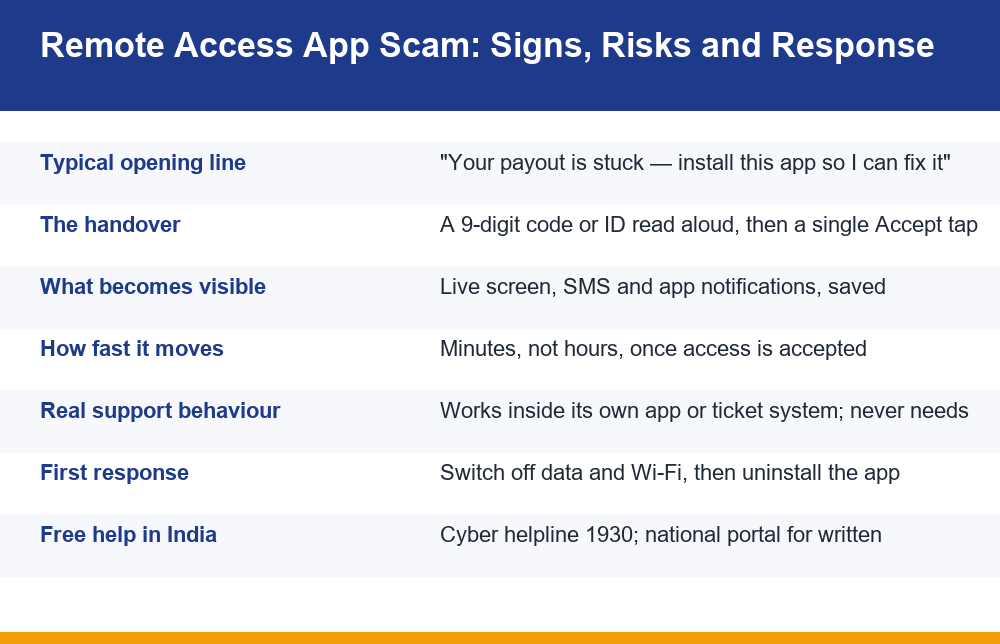
Remote access app scam explained in plain terms
A screen-sharing or remote-desktop app exists for an ordinary reason: an IT team fixes a laptop in another city, a parent helps a relative find a setting, a technician walks someone through a configuration. The app shows a numeric ID or a short code, the other side enters that code, you tap Accept, and your screen becomes their screen. That is the whole mechanism, and it is working exactly as designed at the moment it is abused.
The remote access app scam simply borrows that mechanism and supplies a reason to use it. The reason is always something you already want solved. A withdrawal that has been pending for three days. A deposit that did not credit. A “KYC mismatch” that someone offers to clear from their end. Because the problem is real in your mind, the fix feels proportionate, and the install request arrives at the one moment you are least likely to question it.
The second thing worth understanding is where these contacts come from. People with a stuck payout search for help, land on a number posted in a comment thread, a messaging channel claiming to be official support, or a lookalike site, and call it. The caller is not dialling at random; they are waiting at the end of the search. That is why the conversation feels so well matched to your exact situation — you described the situation first, and in detail, before anyone asked you for anything.
The vocabulary varies and that is deliberate. You may be asked for “quick support”, a “mirroring session”, a “co-browse”, a “diagnostic link” or simply “the app our team uses”. None of those phrases describes a payment process. Every one of them describes the same thing: a live view of your display, handed over by you, on a call where someone else is deciding what happens next.
From there the sequence is almost scripted. Reassurance, a request to install, a request for the code, a request to stay on the call and not touch the phone, then a series of small on-screen actions that look like diagnostics. Nothing in that sequence requires technical skill on the caller’s part. It requires only that you keep listening, and that you keep treating each small request as smaller than the last one you already agreed to.
The 8 warning signs, in the order they usually appear
The signals of a remote access app scam rarely arrive all at once. They stack, and each one is a cleaner exit point than the one after it. If you recognise even the first two, the call can end there with nothing lost. The ordering matters more than the list: by the time the later signs appear, you have already agreed to several smaller things, and each agreement makes the next one feel ordinary.
- The number came from somewhere unofficial. A helpline found in a social post, a search ad, a forum reply or a messaging group is the single most common entry point. Genuine contact details live inside the account you logged into, not in a comment.
- They call you back from a personal number. Support that reaches you from an ordinary mobile number or a messaging profile with a stock photo is not operating a support desk.
- The problem is urgent and expiring. “The payout window closes in twenty minutes.” “The server clears pending requests at midnight.” Urgency exists to stop you from checking anything.
- You are asked to install an app that has nothing to do with gaming. A screen-sharing, remote-desktop or “quick support” tool is never part of fixing a payment. This is the hinge of the entire remote access app scam, and it is the last comfortable place to stop.
- They ask you to read out a code from the screen. A nine-digit ID, a short alphanumeric string, a “session number” — whatever it is called, reading it aloud is the handover itself.
- They tell you to stay on the line and not use the phone. This keeps you from seeing notifications, and it keeps you from calling your bank while they work.
- A small test payment is requested. “Send one rupee so the system refreshes your wallet.” A refund never requires an outgoing payment, in any amount, for any reason.
- They ask for an OTP, a PIN, or a photo of a card or document. By this point the request may feel like a formality after everything else you have already done. It is the end of the script, not a formality.
Signs one to three cost nothing to walk away from. Sign four is the decision point, and it is worth rehearsing a single sentence for it in advance: “I don’t install apps during support calls.” Said flatly, it ends most of these conversations, because the script has no good answer to it and the caller’s time is better spent on someone else.
Signs five to eight mean the response section further down this page matters more than the rest of the article. If any of those four has already happened, stop reading in order and go straight to the step-by-step response.
How a 9-digit code hands over the whole phone
People underestimate the code because it looks like a reference number. It is not a reference number. It is the address of your device on the remote-support network, and anyone who enters it can request a session with you. The only thing standing between that request and a live view of your screen is the Accept prompt you see for a few seconds.
During a call, that prompt is easy to dismiss as a formality. The voice on the line is already saying “just approve it, I’m opening the payment panel now.” Many people tap before reading. Some are talked into enabling an accessibility permission as well, which is how a session can keep working even when the screen appears to be doing something else entirely.
Once a session is live, the remote side is looking at a video of your display in real time and, depending on the app and the permissions granted, can also send taps and keystrokes to it. There is no clever exploit involved. Your phone is doing precisely what the app was built to do, for a person you cannot see and did not verify.
Two details make this worse on a phone than on a computer. First, notification banners appear over whatever is open, so one-time codes and bank alerts become part of the shared view without you opening anything. Second, payment apps on a phone are already authenticated — the hard part of signing in was done long ago, by you, and nothing in the session needs to repeat it.
It is also worth knowing what the code is not. It is not tied to a company, so the fact that a legitimate-looking app displayed it proves nothing about who is on the other end. It is not single-use in any meaningful sense either: as long as the app is installed and the device is online, the same identifier remains reachable, which is why a remote access app scam sometimes goes quiet for a day and then resumes when the phone is left unattended and charging overnight.
Can someone see your UPI PIN through a remote access app?
This is the question that decides how urgently to act, and the honest answer has two halves. Payment apps generally mask the PIN field itself, so the digits usually render as dots rather than numbers. That is a genuine protection and it is worth knowing about. It is also, on its own, very thin.
Masking hides the characters. It does not hide the position of your thumb, the layout of the keypad, the timing of the taps, or the confirmation screen that appears afterwards. More importantly, a stranger watching your screen does not need the PIN at all to cause loss — the PIN is only one of several routes, and typically not the fastest one.
The table below separates what is usually visible during a session from what usually stays protected. Treat the right-hand column as friction, not as safety: every item in it has been worked around at some point, and none of it was designed as a defence against someone you invited in.
| What a live session typically exposes | What usually stays masked or blocked |
|---|---|
| Incoming SMS and notification banners, including one-time codes | The PIN characters themselves, shown as dots in most payment apps |
| Account balances, statements and transaction history | Biometric unlock, which cannot be supplied remotely |
| Saved photos of cards, cheques and identity documents | Some banking screens that detect and block screen capture |
| Email and messaging apps that are already signed in | Hardware-level secure elements on the device |
| Keypad positions and tap timing while a PIN is entered | Passwords stored behind a separately locked manager |
| Any form you fill in while the session is running | Apps you never open during the session |
The practical conclusion is simple enough to act on without debate: assume anything you looked at during a session has been seen, and anything that arrived as a notification has been read. Working from that assumption is what makes the response steps decisive instead of hesitant, and hesitation is the expensive part of a remote access app scam rather than the dots on the PIN pad.
There is one more exposure people forget: the gaming or payment account itself. Even where no money moved, a watcher has seen the registered email address, the linked mobile number and the account balance. That is enough material for a convincing second contact a week later, which is why changing credentials matters even when the first call appears to have failed.
Why genuine support never needs your screen
The cleanest defence against a remote access app scam is knowing that a real support team already holds the information it needs. It can see your account state, your transaction records, your verification status and your ticket history from its own side. Watching you scroll adds nothing it does not have, and it creates a problem it does not want: if an agent is looking at your banking screen, every later dispute becomes unanswerable for both of you.
That is why the rule is unusually clean for a fraud signal. Support that handles money works inside its own interface — the in-app help section, a ticket, a verified email thread. It does not ask you to install a third-party tool, it does not ask for codes from your screen, and it does not ask you to send money in order to receive money. A request that breaks any of those three is not a support process, whatever the caller’s job title sounds like.
A second, quieter test is who started the contact. Support you opened a ticket with answers inside that ticket. Support that arrives unprompted, especially by voice, especially about money you were already worried about, is answering a question you asked somewhere public — and the answer arrived too fast and too conveniently to be a coincidence.
It helps to know in advance where real contact channels sit for the apps you actually use, rather than searching for a number in the middle of a problem. Our breakdown of how to recognise genuine in-app support channels instead of pasted helpline numbers covers how to check a channel before you trust it with anything at all.
There is a related pattern worth naming here, because the two are often run by the same people. After a loss, a second contact appears offering to recover the money for a fee or a “processing charge”. The structure is identical: a real problem, a confident fixer, and a payment that flows the wrong way. What we have documented about the people who promise to get lost deposits back for an upfront fee applies directly to anyone still hoping that a first call can be undone by a second one.
The uncomfortable part of this fraud is that nothing about it looks like a break-in from the inside. Every step was agreed to, each one sounded reasonable at the time, and the only unusual event was a stranger asking for something no legitimate process asks for. That is the single line worth remembering, because it holds whether the caller claims to be from a payment service, a bank or a gaming platform.
If access was already granted: step by step
If you have read a code aloud and tapped accept, the useful question is not what went wrong but what order to do things in now. Speed matters more than completeness, and cutting the connection comes before everything else — including uninstalling, which cannot finish cleanly while a session is live.
- Cut the connection first. Turn on airplane mode, or switch off mobile data and Wi-Fi. This ends the session immediately and stops any action in progress.
- End the call. Do not explain, negotiate or ask for your money back. The call is the pressure, and staying on it is what produces the next mistake.
- Contact your bank through its own number or app. Use the number printed on your card or the one inside the banking app, never a number the caller gave you. Report that your screen was shared and ask what blocks are available on your accounts.
- Call the cyber helpline 1930. It is free and it exists for exactly this situation. Earlier contact generally leaves more room to act on transactions that are still in motion.
- File a written complaint. A phone report and a written record do different jobs; you can submit the written one through the National Cyber Crime Reporting Portal, which has a dedicated path for online financial fraud.
- Uninstall the remote tool once you are offline. Full steps are in the next section.
- Change passwords from a different device. Email first, because it resets everything else, then payment apps, then the gaming account. Doing this on the same phone before it is cleaned up is not worth much.
- Document what happened while it is fresh. The number that called, the app name, the time, the amounts, any transaction references, and screenshots of messages. This is what any complaint or bank query will ask for.
Two things commonly get skipped and both are worth doing the same night. Check for autopay mandates, standing instructions or e-mandates you did not create, because those are easy to set up during a session and easy to miss afterwards. Then review the active sessions or linked-devices list in your email account and your payment apps, and sign out everything you do not recognise.
If the contact also claimed to be an official gaming platform, record the exact name, link and handle that was used. Our notes on putting together a usable complaint about a fake or impersonating app cover which details make a report actionable rather than vague. Keeping the evidence tidy is unglamorous, and it is the part that determines whether anyone can do anything with what you report.
One last point about expectations. Acting fast genuinely improves the odds on money that has not yet settled, and it does not guarantee a recovery. Treat the steps above as damage control rather than a reversal, and be sceptical of anyone — online or on the phone — who promises more certainty than that after the fact. A remote access app scam that has already run is a loss to contain, not a puzzle with a guaranteed solution.
How to remove a remote access app safely
Clearing up after a remote access app scam sounds trivial and usually is, but two things trip people up: a session that is still running, and permissions that outlive the app. Work offline, and check the permissions after the uninstall rather than before.
- Stay offline while you do this. Keep airplane mode on so no new session can start mid-removal.
- Uninstall from Settings, not just the home screen. Open Settings, then Apps, find the tool by name, and choose Uninstall. Dragging an icon off a home screen can leave the app installed.
- Revoke accessibility access. In Settings, look under Accessibility for any installed service you do not recognise and turn it off. This is the permission that lets a tool act on your screen, and it can remain enabled for a leftover service.
- Check Device admin and Display over other apps. Both appear in the special or advanced app permission sections. Remove anything you did not deliberately enable.
- Look for a second app you did not notice. Some scripts install a chat tool or a “verification” app alongside the main one. Sort your app list by install date and review anything from that day.
- Run a Play Protect scan. Open the Play Store, tap your profile, choose Play Protect and scan. It is not a complete answer but it catches known bad packages.
- Reconnect, then review account activity. Check bank and payment app statements, active sessions or linked devices, and any autopay or mandate list for entries you did not create.
On an iPhone the mechanics differ and the risk does not disappear. Third-party apps cannot take the same level of control of the interface, so full remote operation is far less likely. A shared screen is still a shared screen, though: anything visible during a video call or a screen-broadcast session is visible to whoever is watching, including notification banners. Delete the app, check that no configuration profile or unexpected sign-in was added, and review the devices listed on your account.
A factory reset is the thorough option and is reasonable if something still behaves oddly, if you cannot identify what was installed, or if you simply want certainty. Back up photos and documents first, and change your email password from another device before the reset, so a fresh sign-in is not using a password that was already exposed. The ordering above does most of the work; the reset is the belt-and-braces ending, not the main step.
Mistakes that make the damage worse
The hour after a remote access app scam tends to produce a second round of loss, and it is almost always caused by one of a small number of reactions. Each of them is understandable. Each of them helps the other side.
Staying on the call to argue. The caller’s advantage is the conversation. As long as it continues, there is another instruction coming. Hanging up mid-sentence is not rude in this context; it is the correct move.
Calling the same number back. People often redial because the number “answered before” and feels like the only thread to the money. It is the same script with a different voice, and the second call frequently extracts more than the first.
Accepting help from whoever appears next. Posting about the loss in public invites a wave of direct messages from accounts offering recovery. Treat every one of them as part of the same pattern.
Sending a small amount to “unlock” a refund. Money does not move inward because you pushed some outward. No genuine process works that way, and the small amount is a test of whether larger ones will follow.
Reinstalling the app to “check” something. Once it is gone, there is no diagnostic reason to put it back, and a reinstall restores reachability for a device identifier someone already has.
Waiting until morning. Delay is the one thing you fully control and the one thing most worth protecting. A call to your bank and to 1930 at two in the morning is better than a careful summary at ten.
Not telling anyone. Shame keeps this fraud working, because silence means the next person hears the same script cold. The script is well built, the pressure is real, and falling for it says nothing about your intelligence. One honest sentence to a family member stops it reaching someone else in the house.
A closing note on the wider picture, stated plainly: real-money play is for adults 18 and over, it carries real financial risk, and losses are the expected outcome over time. Protecting a payout from a fraudulent call is sensible, and it is a separate matter from whether the play itself was ever going to come out ahead. If the stress of a pending withdrawal is what made the call persuasive in the first place, that is worth sitting with for longer than any removal checklist.
Frequently Asked Questions
Why do scammers ask me to install AnyDesk or a screen sharing app?
Because a remote access app scam is the shortest route to everything on your phone without needing any technical attack. Once a session is live they can see balances, statements, saved documents and every notification banner, including one-time codes, and depending on permissions they can also tap and type on your screen. The install is framed as a fix for a stuck payout or a verification error so that it feels like part of solving your problem rather than the start of a new one.
Can someone see my UPI PIN through a remote access app?
Payment apps generally mask the PIN characters, so the digits usually appear as dots rather than numbers. That protection is real but thin: a watcher still sees the keypad layout, the position of your thumb and the timing of the taps, and far more importantly they see the one-time codes and bank alerts arriving as notifications. Assume anything on screen during a session was seen, and act on that assumption rather than on whether the dots were readable.
What should I do if I already gave remote access to a stranger?
Cut the connection first by switching on airplane mode or turning off data and Wi-Fi, which ends the session immediately. Then hang up without negotiating, contact your bank using the number on your card or inside its own app, and call the free cyber helpline 1930. File a written complaint on the national reporting portal, uninstall the remote tool while still offline, and change your email and payment passwords from a different device.
Is AnyDesk itself a fraud app or is it misused by scammers?
Screen-sharing and remote-desktop tools are legitimate software built for IT teams, technicians and anyone helping a relative with a setting. They are not fraudulent in themselves and they work exactly as designed when they are abused. The fraud lives entirely in the social script around them: a stranger supplies a reason for you to install one and read out the connection code. The useful rule is not about which app it is, but about who asked and why.
How do I safely remove a remote access app from my phone?
Stay offline while you do it so no new session can start. Uninstall from Settings, then Apps, rather than only dragging the icon off a home screen. Afterwards go to Accessibility and turn off any service you do not recognise, check Device admin and the display-over-other-apps permission, look for a second app installed the same day, and run a Play Protect scan. If anything still behaves oddly, a factory reset after backing up and changing your email password is a reasonable step.
Can real customer support ever need access to my screen?
Support that handles money does not need it, because it can already see your account state, transactions and verification status from its own side. Watching your screen adds nothing useful and creates a liability for the company. Genuine support works inside its own app, ticket system or verified email thread. A request to install a third-party tool, read out a code, or send a small payment in order to receive a refund is not a support process regardless of the title the caller gives.
